A toast notification looks simple.
A message appears, stays on screen for a few seconds, and disappears.
But once a notification system needs to handle loading states, asynchronous operations, user actions, queues, accessibility, theming, multiple application instances, and server-rendered environments, the problem becomes much more interesting.
That was the motivation behind Themtfy v2.
Themtfy started as a small toast notification library for JavaScript. With v2, I wanted to take the same lightweight idea and turn it into a more thoughtful, framework-independent notification system—without turning a simple API into a complicated one.
The result is a framework-free JavaScript/TypeScript toast library that can be used with vanilla JavaScript as well as React, Vue, Svelte, Angular, Solid, Preact, Astro, Web Components, and other frontend environments.
Why rebuild Themtfy?
The first version proved that a toast library could stay small and straightforward.
But there was a natural question:
What happens when a notification is part of an actual application rather than just a visual message?
Real applications need more than:
new Themtfy({
  title: "Hello",
});
They need notifications that can represent state.
An upload can start as loading, report progress, and eventually become successful. A failed request may need an action such as retrying. A busy interface may generate several notifications at once. A dashboard may need its own isolated notification container.
Instead of continuing to patch individual features into the original architecture, I decided to redesign the API around a central toast manager.
That became Themtfy v2.
A simpler API
One of the biggest changes in v2 is the API itself.
The old constructor-oriented approach has been replaced by a more familiar imperative API:
import { toast } from "themtfy";
import "themtfy/style.css";

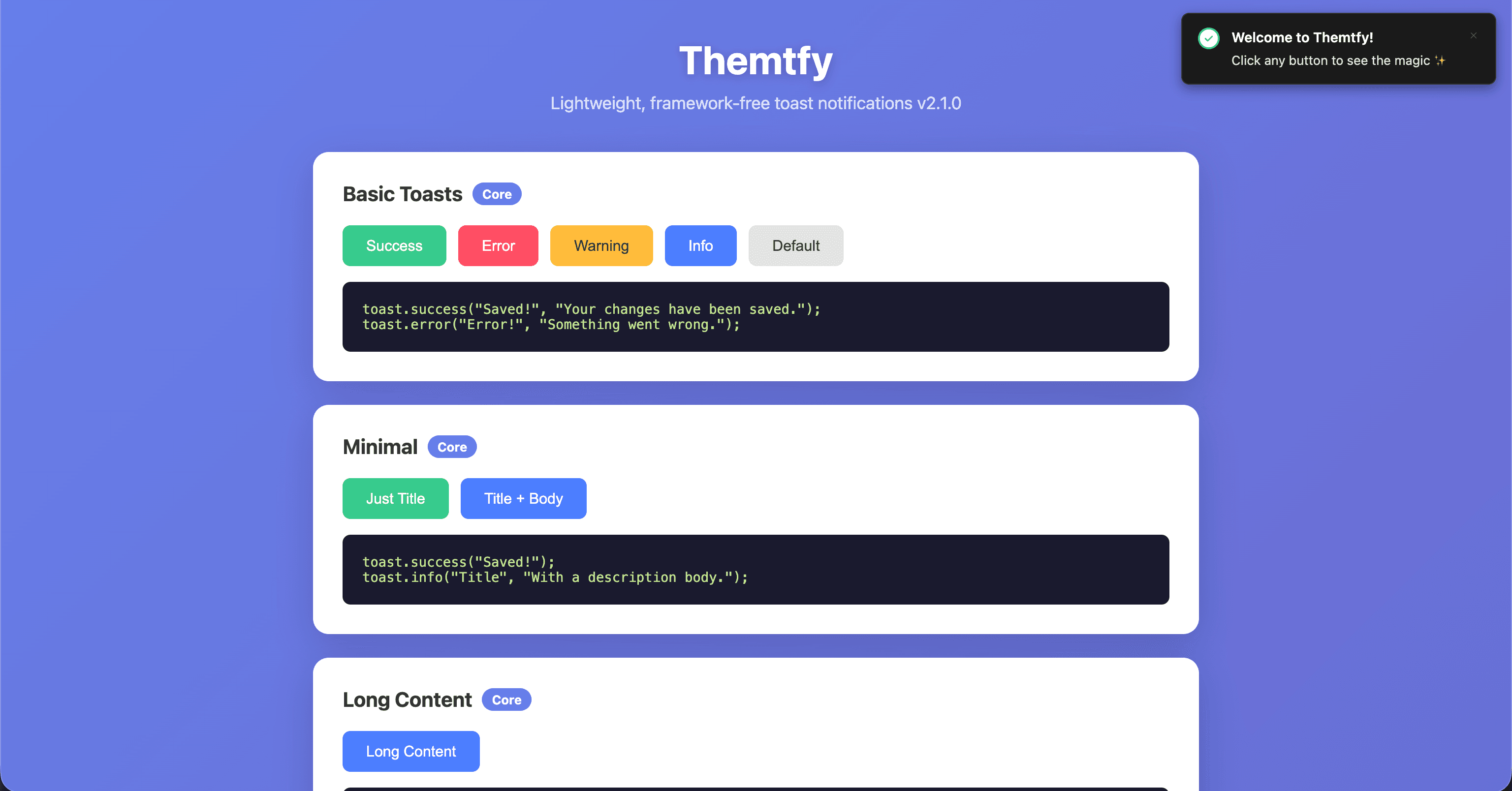
toast.success("Saved", "Your changes have been saved.");
toast.error("Error", "Something went wrong.");
toast.warning("Warning", "Please review your input.");
toast.info("Info", "A new version is available.");
For more control, the generic toast.show() API accepts an options
object:
toast.show({
  title: "Uploading",
  body: "Please wait...",
  type: "info",
  autoClose: false,
});
This gives the library two useful levels of abstraction:
Convenience for common cases, control for advanced cases.
That balance became one of the main design goals of v2.
Notifications are state, not just messages
One of the most important architectural changes was treating a toast as a piece of state.
A toast can now be created, inspected, updated, and dismissed programmatically.
const id = toast.show({
  title: "Uploading",
  type: "info",
});

toast.update(id, {
  title: "Complete",
  body: "Upload finished.",
  type: "success",
  progress: 100,
});

toast.dismiss(id);
The library also exposes methods such as get() and
getAll() for inspecting active notifications.
This sounds small, but it changes how the library can be used.
Instead of creating a new notification every time something changes, the application can keep one notification and evolve it with the underlying operation.
That is particularly useful for uploads, background tasks, installations, imports, exports, and other asynchronous workflows.
Promise-based notifications
Async operations are one of the most common reasons applications use toast notifications.
Themtfy v2 includes a promise-based API specifically for this pattern:
const data = await toast.promise(fetch("/api/data"), {
  loading: {
    title: "Loading...",
    body: "Fetching data...",
  },
  success: (data) => ({
    title: "Loaded",
    body: "Found {data.count} items",
  }),
  error: (error) => ({
    title: "Failed",
    body: error.message || "An error occurred",
  }),
});
The notification lifecycle follows the promise lifecycle:
loading → success / error
This removes repetitive state-management code from application components while keeping the API expressive.
Loading and progress states
A loading notification should behave differently from a normal informational toast.
For that reason, loading toasts do not automatically disappear by default.
They can also be updated as work progresses:
const id = toast.loading("Uploading", "0%");

toast.update(id, {
  body: "50%",
  progress: 50,
});

toast.update(id, {
  title: "Complete",
  body: "Upload finished.",
  type: "success",
  progress: 100,
  autoClose: 3000,
});
This turns the toast from a passive status message into a small, reusable progress surface.
Actions make notifications interactive
Notifications are often the best place to offer a lightweight recovery action.
For example:
toast.show({
  title: "Item deleted",
  body: "The item was moved to trash.",
  action: {
    label: "Undo",
    onClick: () => restoreItem(),
  },
});
Themtfy also supports link-style actions, making it possible to direct users to another part of an application:
action: {
  label: "View post",
  href: "/posts/123",
}
Actions can even control whether the notification closes after interaction.
This is an important UX distinction.
A good toast should not only tell users what happened. In the right situations, it should help them decide what to do next.
Queue management
Notifications become noisy very quickly when an application fires too many at once.
Themtfy v2 introduces explicit queue management through
maxToasts and maxQueue.
const manager = createThemtfy({
  maxToasts: 3,
  maxQueue: 20,
});
Only the configured number of toasts are shown simultaneously, while additional notifications wait in the queue.
When an active toast is dismissed, the next queued notification can be promoted automatically.
This is a small feature with a big UX impact.
The goal is not to show every event as quickly as possible.
The goal is to make application feedback readable.
Deduplication
Another subtle problem with notification systems is duplication.
Imagine a network failure triggering the same notification several times because multiple parts of the application react to the same event.
Themtfy v2 supports dedupeKey:
toast.show({
  title: "Network error",
  dedupeKey: "network-error",
});
Calling the same notification again with the same key can update the existing toast instead of creating another one.
This helps prevent notification storms while preserving the latest state.
Multiple toast managers
A global singleton is convenient, but it isn't always enough.
Large applications sometimes need isolated notification systems—for example, separate areas of an application, embedded widgets, or custom containers.
Themtfy v2 therefore exposes createThemtfy():
const manager = createThemtfy({
  maxToasts: 3,
  maxQueue: 10,
  theme: "dark",
  container: document.getElementById("my-container"),
});
Each manager can have its own configuration and destination.
This keeps the default API simple while still allowing more advanced application architectures.
Framework independence
One of the principles behind Themtfy is that toast notifications should not belong to a specific frontend framework.
The core library is designed to work without React, Vue, Svelte, or another framework-specific runtime.
That means the same library can be used in:
Vanilla JavaScript
React
Vue
Svelte
Angular
Solid
Preact
Astro
Web Components
The benefit is straightforward: the notification system remains independent from the application's UI framework.
This was an intentional architectural decision rather than simply a compatibility feature.
Accessibility is part of the architecture
A notification is only useful when people can actually perceive and interact with it.
Themtfy v2 includes accessibility behavior such as semantic roles, appropriate ARIA live settings, keyboard-accessible close controls, reduced-motion support, and hidden decorative icons for screen readers.
Normal notifications use role="status" with polite announcements,
while errors use role="alert" with assertive announcements.
The library also respects prefers-reduced-motion.
Another important decision is that notifications do not steal focus by default.
That matters because a toast should communicate information without unexpectedly interrupting whatever the user is currently doing.
SSR-safe by design
Modern JavaScript applications frequently use server-side rendering.
That creates a common problem for browser-focused libraries: touching the DOM too early can make imports fail in SSR environments.
Themtfy v2 is designed so that importing the library does not require immediate DOM access.
DOM operations happen when a toast is actually shown.
import { toast } from "themtfy";
This makes the package suitable for environments such as Next.js, Nuxt, and Astro.
For a small UI library, this is exactly the kind of implementation detail that should disappear for the user.
The complexity should live inside the library, not inside every application that consumes it.
Theming without framework lock-in
Theming is handled using CSS custom properties rather than a framework-specific styling system.
That makes the library adaptable to different design systems while keeping the core package framework-independent.
Themtfy supports light, dark, and system themes:
toast.configure({
  theme: "system",
});
The system theme can follow the user's
prefers-color-scheme preference.
This approach also makes it easier to integrate Themtfy into applications that already have their own visual language.
Keeping the migration practical
A major version does not have to mean forcing everyone to rewrite their application immediately.
Themtfy v2 keeps the v1 API available for backward compatibility, while also providing a migration path toward the new API.
The conceptual shift is straightforward:
// v1
new Themtfy({
  title: "Hello",
  body: "World",
});
becomes:
// v2
toast.show({
  title: "Hello",
  body: "World",
});
And common notifications can become even simpler:
toast.success("Hello", "World");
The v2 migration also replaces concepts such as variation with
type, combines distanceX and
distanceY into an offset object, and moves close
callbacks toward an event-based API.
Performance still matters
Adding features to a UI library can easily turn into dependency and bundle-size creep.
Themtfy v2 remains deliberately small.
The current published repository reports an ESM bundle of approximately 38.5 KB, with a 10.4 KB gzipped ESM size, alongside a separate CSS payload.
For a notification library, that tradeoff matters.
Toast notifications should improve the application—not become a disproportionate part of its JavaScript payload.
Testing the library like a real product
The v2 repository is structured around more than just the source code.
It includes unit tests, end-to-end tests, a demo environment, Vite configuration, TypeScript configuration, and continuous-integration workflow files.
That reflects another lesson from building the project:
A library is not finished when the implementation works.
It is finished when its behavior is predictable, testable, documented, and maintainable.
What I learned building Themtfy v2
The biggest lesson was that the difficult part of a small library is rarely writing the first version.
The difficult part is deciding what the abstraction should become once real use cases appear.
With Themtfy, that meant moving from a simple notification constructor toward a system that understands:
notification state
asynchronous operations
progress
user actions
queues
deduplication
isolated managers
theming
accessibility
SSR
backward compatibility
The interesting part is that none of these features needs to make the everyday API complicated.
That was the real goal of v2.
The result
Themtfy v2 is still a small toast library.
But it is no longer just a way to display a message.
It is a lightweight notification system designed around a simple idea:
application feedback should be easy to trigger, easy to control, and difficult to misuse.
The project is open source under the MIT license, and the repository includes documentation, examples, tests, and a live demo.
Final thoughts
Building Themtfy v2 was less about adding as many features as possible and more about deciding which features genuinely belong in a toast library.
The result is an API that can be as simple as:
toast.success("Saved!");
or sophisticated enough to manage asynchronous workflows, queues, actions, custom containers, and application-wide configuration.
That balance is what I wanted from v2:
small enough to stay out of the way, capable enough to be useful.